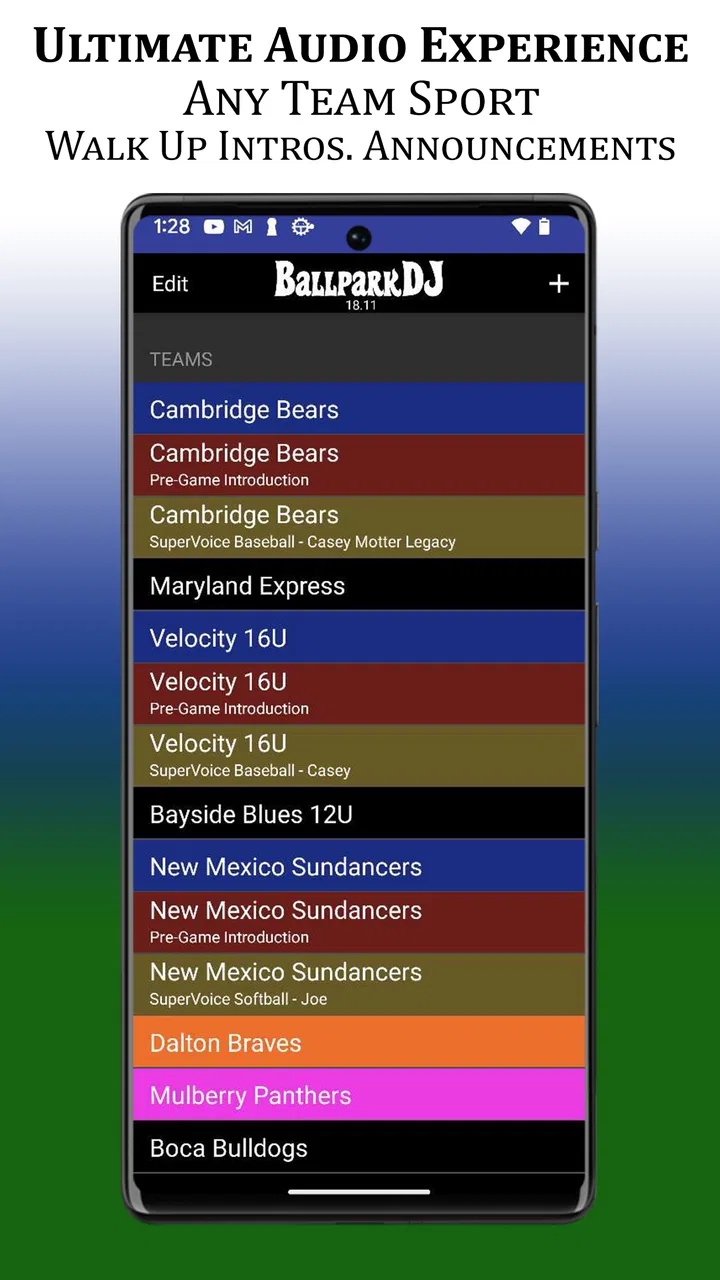
BallparkDJ Walkout Intros
- 4.7
- Rating
- 100.00K
- Installs
- Free
- Price

 Analysis by App-foxy
Walking up to the plate is already a small performance, especially in youth baseball and softball. A player’s name, a short introduction, and a familiar song can turn an ordinary at-bat into a moment the whole team notices. BallparkDJ Walkout Intros is built around that idea: it helps teams prepare player announcements with music instead of relying on a last-second search through a streaming app or a rushed announcement from the dugout.
I see it as a focused sports app rather than a general music player. Its value appears when a coach, parent, announcer, or team volunteer wants a repeatable way to introduce players during games. The experience depends heavily on how well the audio is prepared before the action starts, so connectivity is part of the practical story even when the app itself is being used at a ballpark.
How the app fits into a real game-day routine
The first thing I would do with this app is treat it as a preparation tool, not something to configure while players are already lining up. A team can organize introductions ahead of time, check the order, and make sure every player has the right name and musical cue. That preparation matters more than flashy controls because an announcement app is judged by whether it keeps the game moving.
You May Also Like

 Pandora - Music & Podcasts
Pandora’s Music Is Easy to Start, but Harder to Recover
Pandora’s strength is its low-effort path from a seed to a station. Its weak spot is how much confidence it asks you to place in connection, setup, and quiet recovery.

 8 Ball Pool
 Is Built on Rivalries, Rematches, and Routine
A close look at the rivalries, rematches, shared routines, and unanswered safety questions that turn a quick pool match into a persistent mobile community.

 Samsung Music
’s Quiet Strength Is Playing What You Already Own
Its reach comes less from spectacle than from dependable access to a personal library. That simplicity is both the app’s strongest retention engine and its ceiling.

 AccuWeather: Weather Radar
AccuWeather Review: A Quick, Clear Forecast for Everyday Decisions
For everyday plans, the best forecast is the one you can understand quickly. AccuWeather makes rain timing, radar, and local conditions easy to act on, with a few trade-offs.

 Hill Climb Racing
Why Hill Climb Racing Still Turns Crashes Into One More Run
A tiny car, a bumpy hill and one more upgrade: Hill Climb Racing keeps resurfacing because its simple chaos makes every near-miss feel personal.

 AliExpress - Shopping App
AliExpress Makes Global Shopping Feel Personal, but Shoppers Bear the Risk
AliExpress turns a global marketplace into a pocket-sized discovery engine. Its reach is useful, its shopping loop compelling, and its trade-offs easy to miss.
More From Our News Desk
View All News


The developer is BallparkDJ, and the app sits in the sports category. It is free to install, with in-app purchases listed at $6.99 per item. That makes it easy for a parent or volunteer to try the basic experience without committing money immediately, while the purchase model also means that the complete setup may depend on which items a team chooses to add.
The app has a 4.6 average from around 3.6 thousand ratings, with more than 100 thousand installs. Those figures suggest that it has found a clear audience among teams and families, but they do not remove the need to test it against your own ballpark routine. Audio workflows can feel smooth in one venue and awkward in another because the phone, speaker, announcer, and network conditions all affect the result.
Why advance preparation matters more than the announcement itself
A useful workflow is to build the roster when you have time, not during warmups. Enter names carefully, decide how each introduction should sound, and then run through the sequence in the same order expected during the game. I would also keep the phone charged and avoid changing several settings immediately before the first inning. A small mistake in a player’s name or cue is much more noticeable when the entire field is waiting.
One non-obvious strength of a specialized app is consistency. A generic music player can play a song, and a notes app can store a lineup, but neither one naturally combines the two parts of the announcement. With this kind of tool, the person operating the music does not have to remember which track belongs to which player every time. That reduces mental load for a volunteer who may already be watching the batting order, the scoreboard, and the next player.
There is also a trade-off. A dedicated walkout app is less flexible than building a custom playlist in a full music service. If your team wants long playlists, elaborate transitions, or broad control over an entire event soundtrack, a conventional music app may be more comfortable. BallparkDJ makes more sense when the priority is player-by-player recognition rather than continuous background music.
Connectivity changes the preparation stage
The most important network-related distinction is between preparing the experience and using it at the field. Anything that involves obtaining audio, loading account-based music, or completing an in-app purchase may be more comfortable on a reliable home or clubhouse connection. I would not leave those tasks until arriving at a crowded tournament venue, where cellular service can be inconsistent and many people may be sharing the same network.
I also recommend opening the app before the game and checking the exact material you expect to use. This is not a claim that every part of the app works without a connection; rather, it is a sensible way to discover whether your chosen setup is ready before the announcer calls for the first player. If an item needs to load, authorize, or update, finding that out early gives you time to change plans.
For a normal weekend game, the best routine is simple: prepare at home, review the roster, test the audio path, and then use the phone mainly as an operator’s control surface. That approach keeps network dependence from becoming a visible part of the show. The audience should hear a clean introduction, not hear someone troubleshooting a loading screen beside the dugout.
Using it on a phone beside the field
Mobile use is where the app’s purpose becomes clear. A phone is easier to carry than a laptop, and a parent or team volunteer can manage introductions from a position near the scorer’s table or announcer’s area. The small screen is also the source of the main challenge: outdoor use, bright sunlight, quick glances, and one-handed operation leave little room for confusing navigation.
I would set the screen brightness and volume before the game rather than trying to make adjustments while a player is waiting. If the phone is connected to an external sound system, I would test that connection with a short audio check and confirm that the phone is sending sound to the intended output. The app can organize the announcement, but it cannot compensate for a muted speaker, a disconnected cable, or a sound system set to the wrong input.
A realistic example is a Saturday youth game where one parent is responsible for the introductions while another handles the scorebook. Before the teams take the field, the parent running the music reviews the batting order and opens the relevant player sequence. When the first batter is announced, the operator taps the prepared cue instead of searching for a song. Between innings, the operator can verify the next few names without asking the coach to repeat the lineup.
That division of work is important. I would not give the phone to the person who is also coaching third base, taking photos, or managing substitutions. The app is easiest to use when one person owns the audio job. If nobody can focus on that role, a simple spoken announcement may actually be more reliable than adding music to the process.
Small-screen habits that prevent awkward pauses
My practical advice is to keep the operating sequence short. The person in charge should know which player comes next and should not need to browse through unrelated material. A printed lineup or a second device can help with reference, while the phone running the app remains dedicated to playback. This is one of those small workflow improvements that is easy to overlook but can make the difference between a smooth introduction and a long pause.
I would also avoid experimenting with new audio choices on game day. A song that sounds energetic in headphones may be difficult to recognize through a field speaker, and an introduction that feels funny to adults may embarrass a younger player. The best choices are usually short, recognizable, and appropriate for the player and the team environment. The app can support the presentation, but the human judgment about tone still belongs to the team.
Another useful habit is to identify a fallback announcer. If the main operator needs to step away, someone else should know the basic sequence. This is especially helpful during tournaments, when games can run late and volunteers may rotate. A prepared handoff is better than passing the phone around while the next batter waits.
Who will enjoy the mobile format most?
This app is a strong match for youth teams that want a little ceremony without building a complicated production. It should appeal to coaches who value repeatable routines, parents who enjoy making games feel special, and announcers who want names and music organized together. It can also suit teams that play regularly and would otherwise recreate the same playlist and lineup process every weekend.
I would be more cautious recommending it to someone who only wants occasional music at a casual pickup game. In that situation, the setup may be more work than the benefit justifies. It is also not the obvious choice for a stadium-style production involving multiple microphones, sound operators, dramatic lighting, or a large event playlist. A dedicated audio system or broader music software would provide more control in that environment.
What happens when the connection or setup fails?
Connectivity problems are not the only failure point. The phone can lose access to an expected audio item, the external speaker can disconnect, the battery can run low, or the lineup can change after the app has been prepared. The safest way to use BallparkDJ is to assume that something may need attention and prepare a recovery plan that does not depend on solving every issue in front of the crowd.
Before leaving for the field, I would open the planned player entries and confirm that they respond as expected. If the app presents any loading step, I would complete it while connected to a dependable network. I would then test the actual speaker or audio output, not just the phone’s built-in sound. A phone can appear ready while the audience hears nothing because the sound is being routed elsewhere.
If a cue does not play during the game, the quickest recovery is usually to continue with the spoken announcement and move on. The app should enhance the moment, not hold up the at-bat. A volunteer can troubleshoot between innings, when there is less pressure, rather than repeatedly tapping the same control while the player waits in the box.
Lineup changes deserve special attention. Youth games often involve substitutions, different batting orders, or players arriving late. I would keep the roster information easy to cross-check and avoid assuming that the original order will remain unchanged. If the app’s prepared sequence no longer matches the coach’s instruction, the coach’s instruction wins. An accurate announcement without music is better than a polished but incorrect introduction.
A sensible recovery plan for tournament days
For a tournament, I would prepare more than one layer of backup. First, keep the lineup available outside the app so the announcer can continue without it. Second, bring a charging option suitable for the venue. Third, decide in advance who can take over if the main operator loses signal, battery, or access to the speaker. These are ordinary event-management steps, but they are particularly valuable when the app is being used in a busy, unfamiliar location.
I would also avoid reinstalling or making major account changes immediately before a game. A network-dependent change can create a new problem at exactly the wrong time. If an update or purchase is needed, handle it earlier and then return to the prepared setup. The current version is 24.0.2, and the app supports devices running Android 8.0 or later, so compatibility is worth checking before assigning an older team phone to the job.
The age rating is Everyone, which fits the family-oriented setting in which I would expect the app to be used. Even so, the team should still make its own decisions about music and announcements. An age rating describes the app’s general suitability; it does not choose appropriate songs, jokes, nicknames, or player introductions for a particular group of children.
Keeping mobile data and purchases under control
A data-conscious setup starts with using a stable Wi-Fi connection for preparation whenever possible. I would avoid downloading or configuring audio while standing at a crowded field unless there is no alternative. The exact amount of data used can vary with what the team loads and how the phone handles it, so the practical rule is to prepare early and observe the app’s behavior on your own device rather than guessing.
It is also worth separating the app’s free entry point from the cost of expanding the experience. BallparkDJ is free, but in-app purchases are listed at $6.99 per item. For a single player or a small team, that may be acceptable; for a large roster or several teams sharing one setup, the total can become a meaningful part of the budget. I would decide which players and announcements genuinely need custom treatment instead of purchasing items simply because they are available.
This is another place where a regular music service can be cheaper or more familiar, especially for teams that already have a carefully managed library. The specialized app earns its place when the organization of player announcements saves enough time and confusion to justify the added purchase decisions. If the team only needs one general playlist, its focused structure may not provide enough extra value.
To reduce surprises, I would make purchase decisions while connected to a trusted network and keep the operator’s phone signed in and ready before arriving. I would also avoid switching between several family members’ accounts during setup. Shared devices and shared purchases can become confusing, particularly when the person who prepared the app is not the person running the game.
Privacy and practical responsibility at youth games
Because the app is used around children, I would keep player information limited to what is needed for the announcement. Use the name the team has agreed on, avoid adding unnecessary personal details, and make sure nicknames are welcome before putting them into a public introduction. The app’s role is to support the event, not to become a place for collecting more information than the announcer needs.
I would also remember that network access can affect more than music. A phone at a field may be receiving messages, syncing other apps, or trying to update in the background. Closing unrelated apps and preparing the device beforehand can make the operator’s experience less distracting. This is not unique to BallparkDJ, but it matters more when a single phone is responsible for a public part of the game.
My connectivity verdict after looking at the whole workflow
BallparkDJ makes the most sense when a team wants organized, repeatable player introductions and is willing to prepare them before game time. Its strongest quality is not simply that it plays music; it gives the announcement role a defined workflow. That can be genuinely helpful for youth sports, where the person operating the sound is often a volunteer with limited time and no formal audio training.
Connectivity shapes the experience mainly before and around the game. A reliable connection makes preparation, loading, and purchase-related steps less stressful, while a busy or weak venue network can expose problems if the team waits until the last minute. I would therefore judge the app less by whether it replaces every other music tool and more by whether the team can establish a dependable routine around it.
The app is not the right choice for every situation. A casual game may not need individual walkout cues, and a professional event may require a more advanced soundboard or production system. Teams with frequent roster changes also need disciplined preparation so that the audio sequence does not become out of date. Those limitations are reasonable for a focused tool, but they should be understood before making it part of the game-day plan.
For the right user, I would recommend trying the free version at a low-pressure practice or scrimmage first. Build a small test lineup, use the actual field speaker, and see how smoothly another volunteer can operate it. If that trial feels natural, the app can add personality without taking over the game. If the setup creates more work than excitement, a simple spoken introduction and a conventional playlist may be the better answer.
My final view is positive but practical: the best BallparkDJ experience comes from preparation, not improvisation. Prepare while connected to a dependable network, check the mobile audio path, keep a spoken fallback, and make purchases selectively. Used that way, it can turn player announcements into a memorable part of a youth sports game while keeping connectivity problems in the background where they belong.
FAQs for BallparkDJ Walkout Intros
01What is BallparkDJ Walkout Intros?
BallparkDJ Walkout Intros is an app designed to enhance the sports experience by providing customized player introduction music and announcements. Users can create personalized intros for baseball, softball, or any other sport, making each player's entry onto the field memorable and exciting. It's a great tool for coaches, parents, and event organizers.
02How do I create a custom walkout intro using the app?
To create a custom walkout intro, first select a player from your team within the app. Then, choose a song or sound clip from your device or the app's library. You can add voice recordings for player announcements and adjust the timing to fit your preferences. The app provides an intuitive interface to streamline this process.
03Is BallparkDJ Walkout Intros available for both Android and iOS?
Yes, BallparkDJ Walkout Intros is available for download on both Android and iOS platforms. You can find it on the Google Play Store for Android devices and the Apple App Store for iOS devices. Ensure your device meets the app’s system requirements for optimal performance.
04Are there any costs associated with using the app?
BallparkDJ Walkout Intros offers both free and premium versions. The free version includes basic features, while the premium version provides access to an expanded music library, additional customization options, and ad-free usage. Users can choose to upgrade to the premium version through in-app purchases.
05Can the app be used for sports other than baseball or softball?
Absolutely! While BallparkDJ Walkout Intros is popular for baseball and softball, it can be used for any sport or event where player introductions are needed. Whether it's soccer, basketball, or even school events, the app's flexible features allow for creative and personalized introductions.
Pros
- Customizable player introductions.
- Wide selection of voice options.
- Easy-to-use interface.
- Supports music integration.
- Quick setup and editing.
Cons
- Limited free features.
- Some voices require purchase.
- Occasional app crashes.
- Music library can be restrictive.
- In-app ads can be distracting.

BallparkDJ Walkout Intros
Gallery